Guide
Transcribing confidential interviews without exposing your source or client
Some conversations carry an obligation heavier than convenience: a journalist protecting a source, a lawyer under privilege, an HR professional in a sensitive case, a researcher who promised anonymity. Transcription makes that work manageable, but most tools quietly break the promise by sending the audio to someone else's server. We built Fieldnoter for this kind of material, so read this as coming from the people who make one of the on-device options. It covers what that upload actually means, what to settle before you press record, and a full workflow that keeps the material on hardware you control.
In this article
What uploading means for these conversations
When interview audio is processed in the cloud, a third party technically holds a copy of the most sensitive material you have. For most professions that raises specific problems:
- Journalists: source protection weakens the moment a subpoena-able company holds the recording. This is not hypothetical; it is why newsroom security guides warn against cloud transcription for sensitive material.
- Lawyers: privileged conversations that pass through a third-party processor create questions you do not want to answer later, and many firms prohibit it outright.
- HR and works councils: a grievance conversation on a US server is a data protection incident waiting to be described that way.
- Researchers: ethics boards increasingly ask where interview audio is processed, and "a cloud service" prolongs approval or sinks it.
To be fair to the cloud tools: they offer things a phone cannot, like team libraries, meeting bots that join calls, and larger models for the noisiest audio. For everyday meeting notes those are reasonable trades. For material where a single copy in the wrong place is a professional failure, they are the wrong default.
Before you press record
None of this is legal advice. Recording law differs by country, and your professional obligations may be stricter than the law. Whatever tool you use, four things are worth settling before any sensitive interview:
- Consent. Know whether your jurisdiction requires all parties to agree to a recording, and what your profession expects on top of that. For most interview work, asking on the record is standard practice anyway.
- Retention. Agree, with yourself or your organization, how long the audio and transcript will exist and when they get deleted. A recording you no longer hold cannot leak.
- Anonymity promises. If you promised a source or participant anonymity, decide before recording how names will be handled in the transcript and in anything you export.
- Your organization's rules. Newsrooms, law firms, HR departments, and ethics boards often have recording policies of their own. Check them first; a tool choice does not override them.
The alternative: keep processing on your device
Modern iPhones can run speech recognition, speaker separation, and summarization locally. Practically, that changes the terms:
- The audio exists in exactly one place, on hardware you control, protected by the device's encryption.
- There is no company that can be compelled, breached, or acquired with your recordings on its servers.
- You can verify the claim instead of trusting it: transcribe with the phone in airplane mode.
How this works technically: on-device transcription explained. One caveat belongs here, and we would rather state it than let you find it: an on-device app still makes a single network call, a one-time download of the speech model at first setup. After that it runs offline, and you can check it yourself:
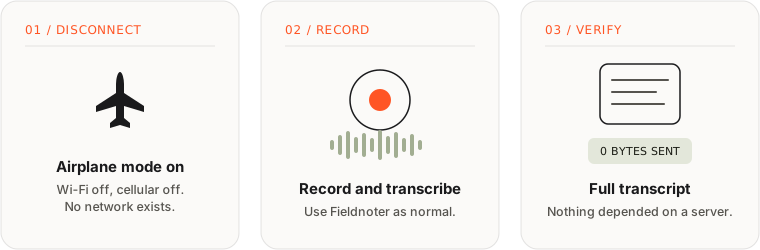
Need to convince an IT department or an ethics board? We keep a technical fact sheet that covers data flows and network behavior, and it prints to a single A4.
Read the IT fact sheet →The workflow, step by step
The full loop in Fieldnoter, from conversation to archive:
- Record or import. Record live with the phone in the room, or import audio or video you already have. Both go through the same local pipeline.
- Pick the interview template. Fieldnoter includes templates per type of conversation, including interview, legal, and 1-on-1. The template shapes what the summary pays attention to.
- Label the speakers. Speaker separation splits the transcript by voice. Rename Speaker 1 to a real name with a tap, or deliberately leave the labels generic for material where even the transcript is sensitive.
- Summarise and pull out follow-ups. The on-device summary gives you the shape of the conversation; action items (early access) can go straight to Reminders.
- File it under a client or project. Recordings are organized by client or project inside the app, which keeps a long-running investigation or case together.
- Export to the format your archive needs. TXT for reading, SRT or VTT for anything with video, JSON or CSV for structured archives. The table below has the details.
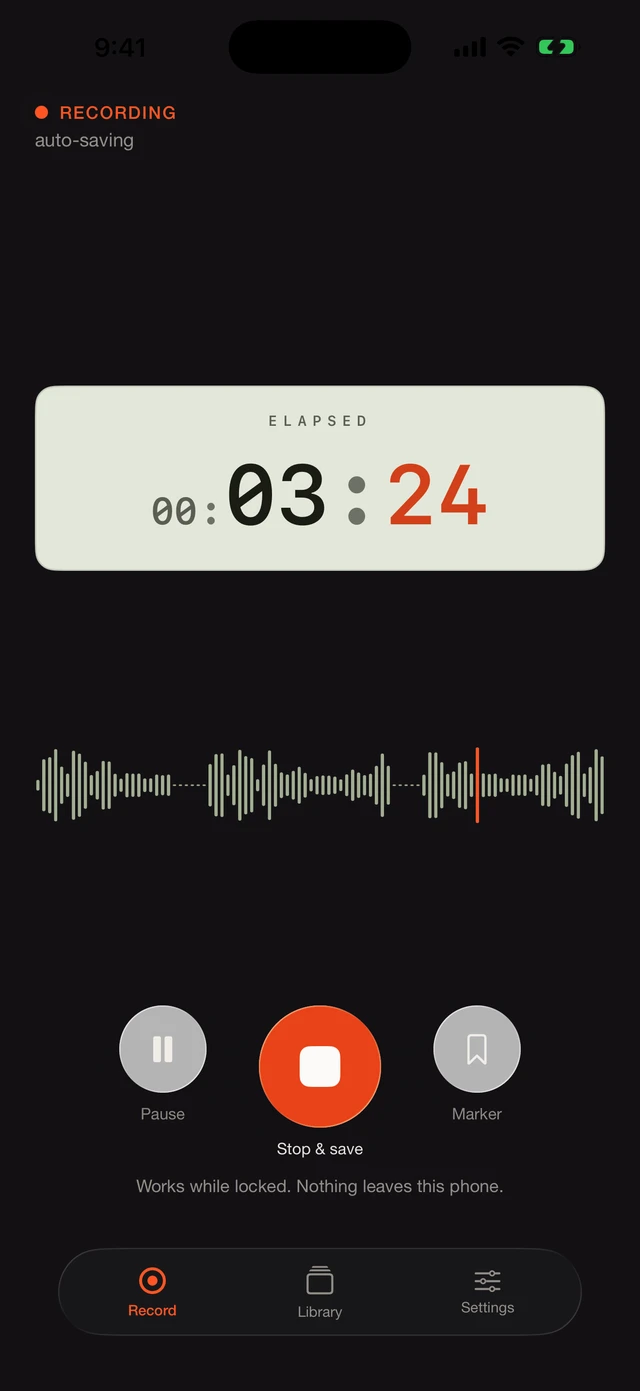
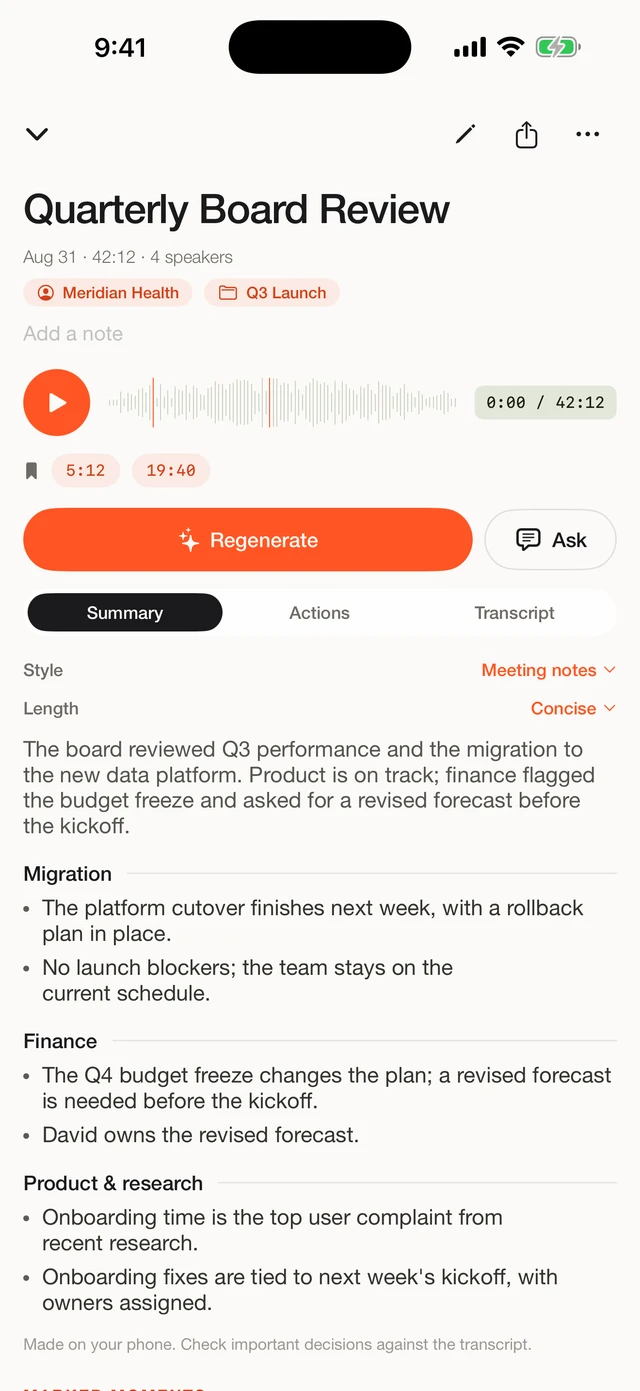
Importing an existing recording
Not every interview happens with your phone on the table. Perhaps you use a dedicated recorder, received audio from a colleague, or have the recording of a video call. Fieldnoter treats import as an equal citizen to live recording: share the file into the app or pick it from Files, and it runs through the same local pipeline. Video files work too; the app uses the audio track.
The point for confidential work: a recording that already exists does not need to be uploaded anywhere to become a transcript. Processing happens on the phone regardless of where the audio came from. The one thing import cannot fix is the past of the file itself; if the recording was made with a cloud service, a copy may already exist on that service's servers.
Export formats and what they are for
An archive you cannot read in ten years is not an archive. Fieldnoter exports to five plain, documented formats:
| Format | What it is | Use it for |
|---|---|---|
| TXT | Plain text | Reading, quoting, pasting into a document |
| SRT | Subtitles with timestamps | Subtitling video, checking quotes against the recording |
| VTT | Web subtitle format | Video players and web-based archives |
| JSON | Structured data with segments, speakers, timestamps | Research archives, custom tooling |
| CSV | Spreadsheet rows | Coding interviews in qualitative analysis |
One caution: the export is where your control ends. A transcript pasted into a cloud document reintroduces exactly the third party you avoided during processing. Match the destination to the sensitivity of the material.
Practical notes for sensitive work
- Consent and law first. On-device processing protects the recording; it does not replace the rules about making one. Know your jurisdiction and your profession's requirements before pressing record.
- Lock the app separately. A phone gets handed around more often than you think. Fieldnoter supports a Face ID lock on top of the device passcode.
- Mind your exports. The private part is only as private as where you send the transcript afterwards. Exporting into a cloud document reintroduces the third party you avoided.
- Names can stay out of it. Speaker labels do not need real names for material where even the transcript is sensitive; leaving it at "Speaker 1" is a legitimate choice.
- Delete on schedule. When your retention period ends, delete the recording in the app. Because there is no server copy, deleting it there is deleting it everywhere.
Frequently asked questions
Can I transcribe interviews I recorded on another device?
Yes. Import the audio or video file into Fieldnoter and it goes through the same on-device pipeline as a live recording: transcript, speaker labels, and summary. Where the file came from does not change where the processing happens.
Do I need consent to record an interview?
That depends on your jurisdiction and your profession's rules, and this guide is not legal advice. In many places participants may record conversations they take part in, but professional obligations are often stricter than the law. When in doubt, ask the people in the room; for most interview work, asking is standard practice anyway.
Is the transcript accurate enough to quote from?
For clear audio, on-device transcription is comparable to cloud services. For anything you publish or file, check quotes against the recording. Every segment carries a timestamp, so finding the passage in the audio takes seconds.
What protects the transcripts if someone else has my phone?
Fieldnoter supports a Face ID app lock on top of the device passcode, so opening the app requires your face or the passcode. Recordings and transcripts exist only inside the app on the device; there is no web dashboard to breach.
Does Fieldnoter need an account?
No. There is no account, no login, and no server storing your material. The App Store privacy label reads Data Not Collected. Your first 10 transcriptions are free; after that a one-time purchase of 19.99 euros gives you the full app, with no subscription.
We built Fieldnoter to record or import an interview and produce a transcript with speaker labels and a summary, entirely on your iPhone. No account, no server, and it works in airplane mode so you can verify the claim rather than take our word for it. The first 10 transcriptions are free. If it fits how you work, it is on the App Store.
See Fieldnoter