Comparison
Cloud notetakers blocked at work? Here are your actual options.
It is a common situation now: your company blocks AI meeting tools because conversation audio ends up on third-party servers, but the meetings keep coming and someone still has to produce the notes. We make one of the options below, an on-device app called Fieldnoter, so read the section about it as coming from the people who build it. The rest of this page weighs every route on the same terms, including the ones that are not ours: features first, then what each costs over a year, then the question that usually settles it, where your audio actually goes.
In this article
Option 1: cloud notetakers
Otter, Fireflies, Fathom and similar services
Audio processed on their servers · subscription
The most polished experience if you are allowed to use them: automatic meeting joining, web dashboards, team workspaces. The problem is structural, not a settings toggle: your audio is uploaded, processed, and usually stored by a third party, often in the US. That is precisely what compliance teams object to, and a privacy policy does not change where the data goes. If these tools are blocked at your workplace, that decision usually will not be reversed for a notetaker.
Credit where it is due: for teams that are allowed to use them, cloud platforms genuinely do more. A bot that joins every call, transcripts searchable across the whole team, integrations with CRMs and project tools. If the ban is your only objection, the rest of this page is for you. If you simply want those features and your company permits them, a cloud notetaker is a reasonable choice.
Option 2: what is already on your iPhone
Voice Memos and Notes transcription
On-device · free
Recent iOS versions transcribe voice memos and phone calls on the device, for free. For a quick personal memo this is genuinely enough. What it does not do: tell speakers apart, summarize, extract action items, handle long multi-person meetings well, or organize recordings by client or project. It is a transcript, not meeting notes.
Worth knowing before you rely on it: the built-in transcript is a single block of text with no speaker labels, so a one-hour meeting between four people becomes a wall of words. There is also no export designed for downstream work, and no way to keep project A separate from project B beyond folder names. As a fallback it is solid; as a daily meeting workflow it runs out of road quickly.
Option 3: run the models yourself
Whisper on your own machine
Local · free · technical
Open speech models like Whisper run well on a modern Mac, and if you enjoy the command line this route is free and fully private. The trade-offs are workflow-shaped: you record on one device and process on another, speaker separation and summaries need extra tooling, and nothing about it works during your workday on a phone. Great for tinkerers, hard to live with as a daily meeting routine.
If you go this way, budget for the hidden work: keeping the model and its dependencies updated, wiring up a separate diarization step if you want speaker labels, and building your own habit of moving recordings from phone to laptop. None of it is difficult for a technical person. All of it is friction that recurs every single meeting.
Option 4: on-device apps
Fieldnoter (that is us)
On-device · one-time purchase
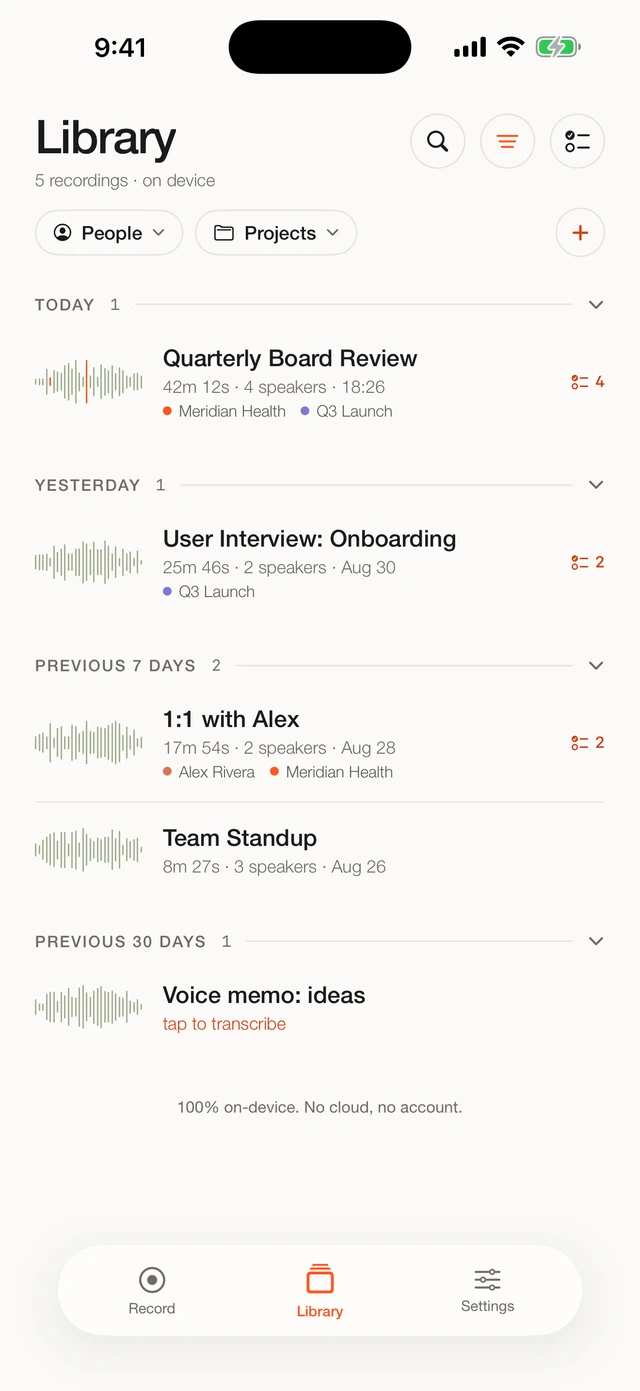
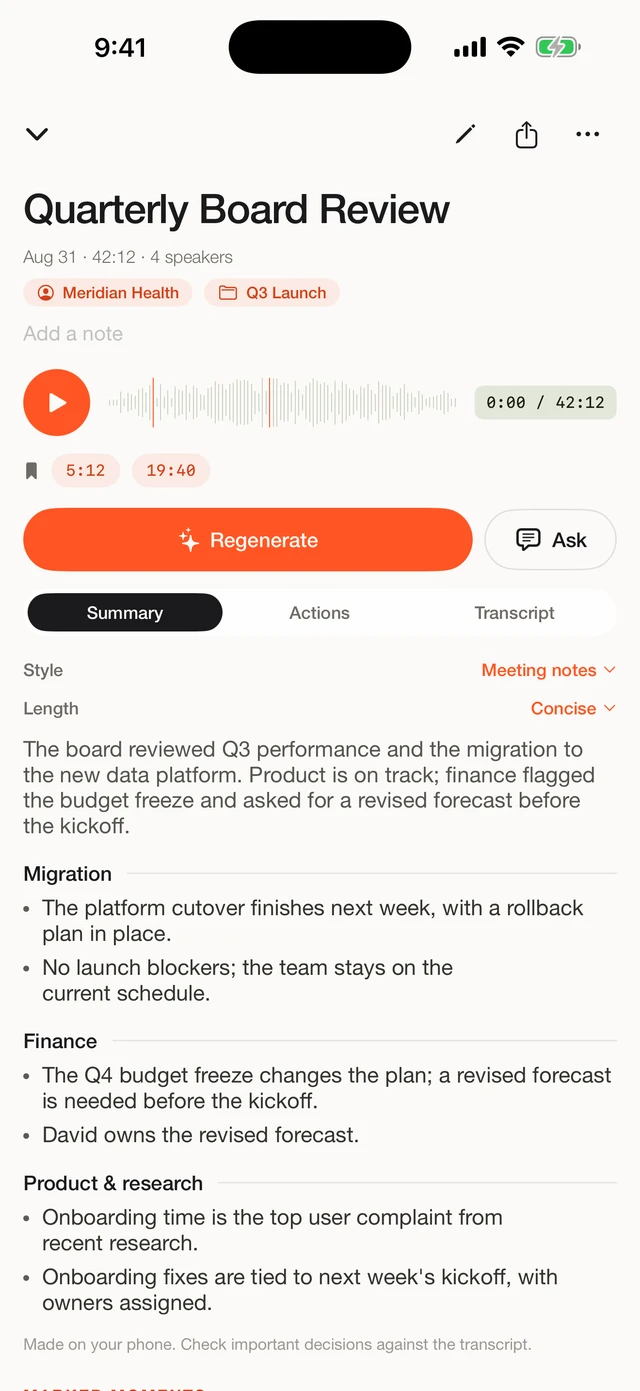
The same class of models as option 3, but packaged for the actual workflow: record or import on your iPhone, get a transcript with speaker labels, a summary, and action items (early access), all processed on the phone's Neural Engine. No account, no server, works in airplane mode. What we deliberately do not offer: automatic meeting joining, web dashboards, or team workspaces. One professional, one phone, everything stays in your pocket.
Beyond the transcript itself: recordings are organized by client or project, summaries follow templates per field of work, action items (early access) can be sent to Apple Reminders, and the app can sit behind Face ID. Exports cover TXT, SRT, VTT, JSON and CSV for whatever happens after the meeting.
Side by side
| Cloud notetakers | iPhone built-in | Whisper DIY | Fieldnoter | |
|---|---|---|---|---|
| Audio leaves your device | Yes | No | No | No |
| Speaker labels | Yes | No | Extra tooling | Yes |
| Summary and action items | Yes | Limited | Extra tooling | Yes (early access) |
| Works in airplane mode | No | Yes | Yes | Yes |
| Passes a cloud ban | No | Yes | Yes | Yes |
| Effort to set up | Low | None | High | Low |
| Pricing | Subscription | Free | Free | One-time purchase |
Need to get any of these routes past your IT team? The fact sheet covers data flows, network behavior, and the GDPR position, and it prints to a single A4.
Read the IT fact sheet →What each route costs over a year
The pricing models differ more than the feature lists do. Cloud notetakers are subscriptions: paid plans typically land somewhere between 100 and 200 euros per year when billed annually, with exact figures varying by provider and plan. That price buys real infrastructure, server hardware, a web platform, and engineers keeping meeting bots compatible with every conferencing tool. It is a fair price for what it delivers. It just never stops.
The other three routes avoid the recurring cost. Apple's built-in transcription is free. A DIY Whisper setup is free software, although your setup time and ongoing maintenance are not. Fieldnoter is a one-time purchase of 19.99 euros after 10 free transcriptions, with no subscription and no account. Over three years, that is roughly 15 euros against a typical 300 to 600 euros for a subscription tool.
A caveat in the other direction: if your work depends on the things only cloud platforms offer, such as meeting bots, team-wide transcript search, or a shared workspace, then the subscription buys functionality you would otherwise have to do by hand. Paying less for a tool that does not cover your workflow is a false saving.
Where your data goes on each route
Feature tables skip the question compliance teams ask first: who can touch the audio? The four routes give four different answers.
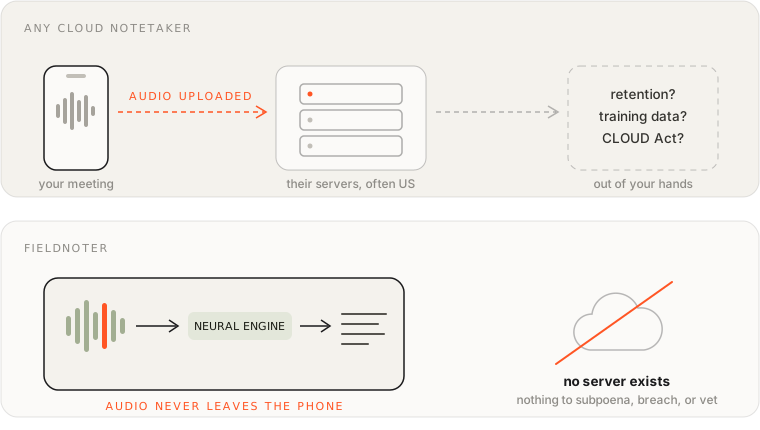
- Cloud notetakers. Audio is uploaded, processed, and usually stored on the provider's servers, often in the US. Retention, model training, and responses to government access requests are governed by the vendor's contract. Under GDPR, the provider becomes a data processor for your organization, with everything that entails.
- iPhone built-in. Transcription runs on the device. The recordings live in Apple's own apps, so where they end up follows your iCloud settings; check whether your voice memos sync to iCloud if that matters for your situation.
- Whisper DIY. Everything stays on hardware you control. The data handling is exactly as good as your own laptop discipline: disk encryption, backups, and who else has access to the machine.
- On-device app. Audio and transcripts stay inside the app on your phone, behind Face ID if you enable it. Fieldnoter carries the App Store privacy label "Data Not Collected" and makes one network call ever: the model download at first setup. After that, it runs offline, and you can verify that in airplane mode.
If your interest in this question is regulatory, we cover the processor roles, data processing agreements, and transfer rules in a separate guide: is AI meeting transcription GDPR-compliant?
How to choose
- Allowed to use the cloud and want meeting bots and dashboards? A cloud notetaker is the full-featured route.
- Occasional personal memo? Your iPhone already does this for free.
- Technical and happy to build your own pipeline? Whisper on a Mac is free and private.
- Real meetings, confidentiality requirements, no patience for tooling? That is the gap Fieldnoter was built for.
Whichever way you go: if IT approval is the bottleneck, our fact sheet for IT and security teams explains how to evaluate on-device tools in general, including the airplane-mode test that works on any app.
Frequently asked questions
Are on-device apps as accurate as cloud notetakers?
For clear meeting audio, the results are comparable, because on-device apps run the same class of open speech models that many cloud services build on. Cloud services can still have an edge on very noisy recordings or unusual accents, since they can run larger models on server hardware. If your audio is routinely difficult, test both before you decide.
Can I transcribe a Zoom or Teams meeting without a meeting bot?
Yes, in two ways. You can record the meeting from your phone in the room, or you can import an existing audio or video recording into an app like Fieldnoter and transcribe it there. Nothing joins the call automatically; the recording step is yours.
What does on-device transcription cost compared with a subscription?
Cloud notetakers typically cost somewhere between 100 and 200 euros per year on annually billed paid plans. Fieldnoter is a one-time purchase of 19.99 euros after 10 free transcriptions, with no subscription. Apple's built-in transcription and a DIY Whisper setup are free, apart from your time.
How do I check whether an app is really on-device?
Put the phone in airplane mode and transcribe a short recording. A genuinely on-device app finishes the job with the radios off; a cloud app shows a spinner or an error. Also check the App Store privacy label: Data Not Collected is a claim Apple audits.
Do I need an account to use an on-device transcription app?
Not for Fieldnoter. There is no account, no login, and no server that would need one. The only network activity is a one-time model download when you first set up the app; after that it works offline.
We built Fieldnoter for the case in the last row: real meetings that have to stay on one phone, with the speaker labels, summary, and exports the built-in tools leave out. If that is your situation, it is on the App Store. If one of the other three routes fits how you work better, use that one instead. We would rather point you to the right tool than the one with our name on it.
See Fieldnoter