Explainer
On-device transcription: what your iPhone can do without the cloud
For years, good speech recognition meant sending audio to a data center. That changed, and it is the reason we built Fieldnoter the way we did. Modern iPhones carry a Neural Engine that runs the same class of speech models that used to need a server, and open models have caught up in quality. Transcribing an hour-long meeting entirely on the phone is no longer a compromise. We wrote this to explain how that works in plain language, why it became practical only recently, and where the honest limits still are.
In this article
What an on-device speech model is
A speech model is a neural network trained on enormous amounts of audio paired with text. After training, the model is essentially one large file of numbers, called weights. Feed it audio and it predicts the words that were spoken. The important consequence: the model runs wherever that file lives. Put it on a server and you get a cloud service. Put it on a phone and you get on-device transcription. The mathematics is identical.
The best-known family is Whisper, an open model released in 2022. Because the weights are public, anyone can run them, adapt them, and shrink them. A whole ecosystem of Whisper-class open models has grown since, including models tuned specifically for local use on consumer hardware.
Shrinking matters, because a phone has far less memory than a server. The main technique is quantisation: storing each weight with less precision, roughly like rounding prices to whole euros instead of cents. The file becomes several times smaller and the model needs far less memory, while transcription quality stays close to the original. Quantisation is a large part of why a server-grade model now fits comfortably on a phone.
The other ingredient is the chip. Every recent iPhone includes a Neural Engine: a separate processor block on the chip designed for one job, running neural networks. It handles the matrix arithmetic these models consist of far more efficiently than the general-purpose CPU, which keeps transcription fast and the battery cost reasonable.
Why this became possible around 2023
Neither ingredient is new on its own. What changed is that two curves crossed. Open speech models became markedly more efficient: smaller variants, better compression, and runtimes built specifically for Apple hardware appeared in quick succession. Meanwhile the Neural Engine got faster with each chip generation, and phones shipped with more memory. Around 2023 the practical question flipped from whether a phone could transcribe at all to whether there was still a reason to send the audio anywhere else. Recent iPhones transcribe a meeting several times faster than the meeting took, entirely locally.
How it works in Fieldnoter
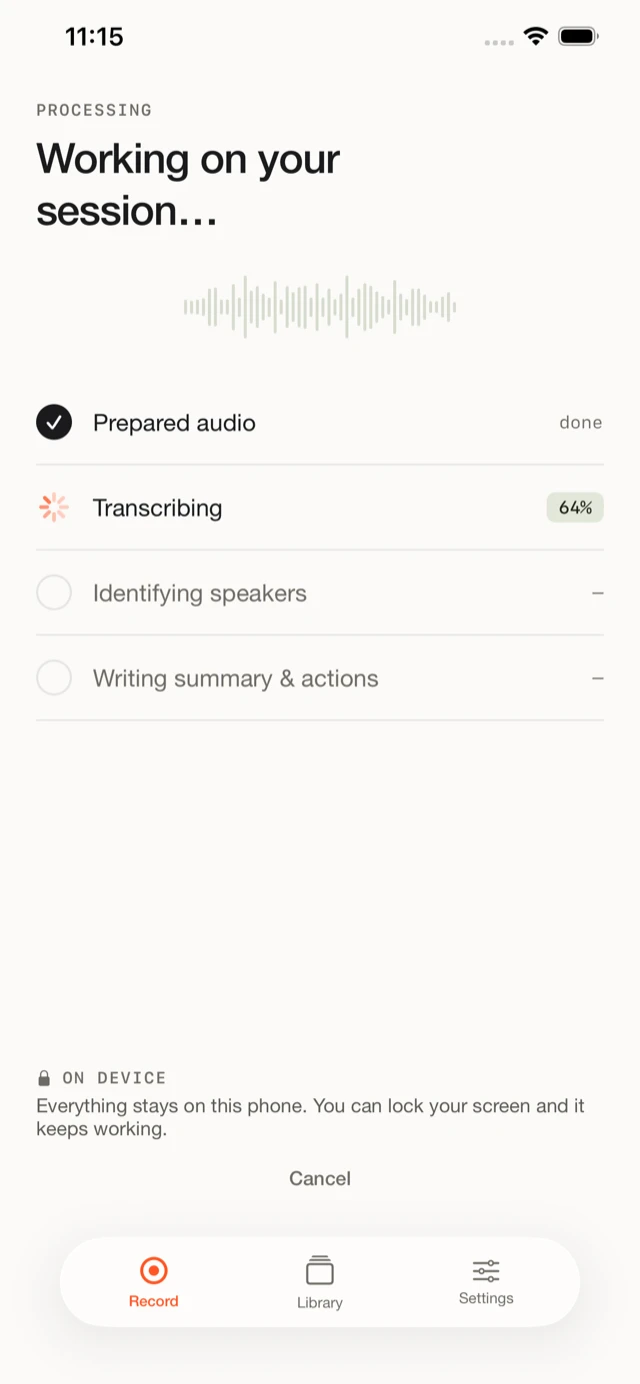
In Fieldnoter we chain three local models together:
- Speech to text. Fieldnoter runs open speech models (Parakeet, and Whisper for extra languages) directly on the iPhone's Neural Engine. The model is downloaded once, about the size of a podcast season, and lives on your device. After that, transcription works in airplane mode.
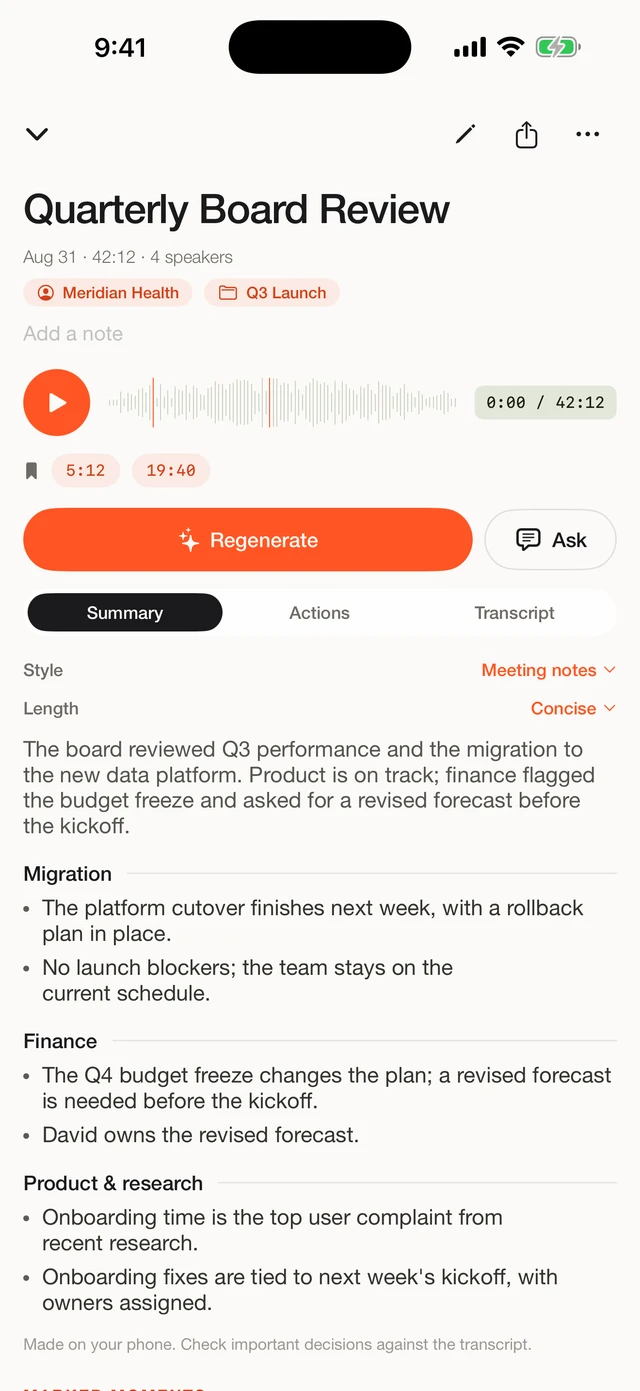
- Who said what. A local speaker-separation model splits the conversation into voices and labels every paragraph. Name a speaker once and Fieldnoter recognizes that voice in future recordings, also on-device.
- Summary and action items. A local language model turns the transcript into a short summary with action items (early access). Nothing is sent anywhere to make that happen.
Here is what that pipeline looks like in the app, from processing to finished transcript:
What speaker recognition adds
Transcription answers what was said. Speaker recognition, formally called diarization, answers who said it. A separate model listens to the sound of each voice rather than the words, and groups the audio into voices: this stretch belongs to one speaker, that stretch to another. Fieldnoter merges those groups with the transcript so every paragraph carries a label.
The labels start out generic, Speaker 1 and Speaker 2, and you rename them with a tap. Name a voice once and the app recognizes it in later recordings, which saves the relabelling on recurring meetings. For a two-hour conversation, diarization is the difference between a wall of text and a readable document. It runs on the phone, like everything else in the pipeline.
Evaluating this for an organization? The technical fact sheet covers data flows, network behavior, and the GDPR position, and prints to a single A4.
Read the IT fact sheet →Why on-device matters more than a privacy policy
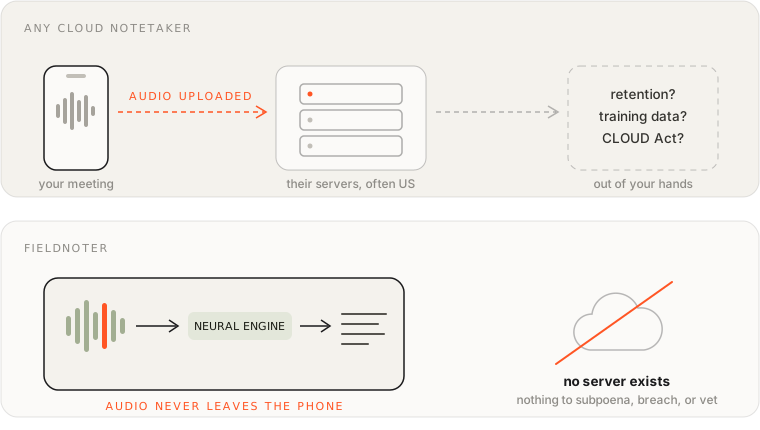
A privacy policy is a promise about what a company does with your data. On-device processing removes the question: there is no company in the loop for your audio at all. That distinction is why compliance teams treat local processing differently, and why laws aimed at cloud providers, like the US CLOUD Act, have nothing to reach when recordings never leave the phone.
The honest limits
On-device transcription is very good, and it still has a ceiling. This is the one place where cloud services keep a genuine advantage: a data center can run models too large to fit on any phone. For clear meeting audio the difference is small. On the hardest material it shows:
- Very noisy audio. A recorder in the middle of a busy restaurant challenges every system, and larger server models recover from bad audio more often.
- People talking over each other. Overlapping speech stays hard for transcription and diarization alike, local or cloud.
- Heavy accents and uncommon dialects. Any model can stumble here; bigger models stumble less.
We built Fieldnoter around fixing those cases quickly: correct a speaker with one tap, add your own jargon to the vocabulary, and improve weak passages with a bigger model when you want. If your daily material is shouted conversations on factory floors, test carefully before committing to any tool, ours included.
The one-time model download
There is one honest asterisk to the word offline: the first launch. Speech models are large files, and bundling every model would make the app itself very heavy to download. So Fieldnoter ships small and fetches the model you need once, ideally over Wi-Fi. That download is the app's one network moment. The model is stored on your device, and from then on the app works without any connection.
This is also why we never claim the app never touches the internet. It does, exactly once, to get the model. Every claim after that moment is verifiable on your own phone, which brings us to the test.
The airplane-mode test
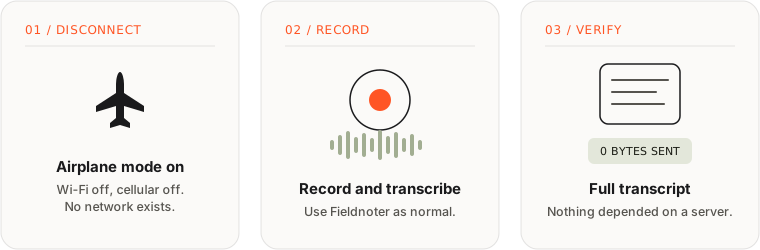
Any claim about local processing should be checkable, and for on-device apps it is. Put the phone in airplane mode, record a minute of speech, and let the app transcribe it. If a transcript appears with the radios off, nothing in that pipeline depends on a server. If you get a spinner and an error instead, the audio was leaving the phone all along.
What you need
- An iPhone from recent years. Newer devices transcribe several times faster than real time.
- One model download, ideally on Wi-Fi. After that, no connection is needed.
- Nothing else. No account, no subscription, no setup.
Frequently asked questions
Does on-device transcription work without an internet connection?
Yes. After a one-time model download when you first set up the app, everything runs on the phone: transcription, speaker labels, and summaries. You can confirm it yourself by switching to airplane mode and recording.
How much battery does transcribing use?
Transcription is real work for the chip, so it draws noticeable power, roughly on par with watching video for the same stretch of time. The Neural Engine does the heavy lifting efficiently, and transcribing finishes faster than the recording is long. If you record all day, keep a charger nearby.
Is on-device transcription as accurate as cloud services?
For clear meeting and interview audio the results are comparable, because on-device apps run the same class of open speech models that many cloud services build on. Cloud services can still have an edge on very noisy recordings and heavy accents, since they can run larger models on server hardware.
Why does the app download a model on first use?
Speech models are large files. Bundling every one of them would make the app itself very heavy to download, so we ship Fieldnoter small and fetch the model you need once, ideally over Wi-Fi. The model then lives on your device and the app works offline from then on.
Where do my recordings and transcripts live?
On your iPhone, inside the app, and nowhere else. There is no account and no server copy. Exports go only where you send them, and deleting a recording removes it from the device.
We built Fieldnoter because we wanted this whole pipeline to run on the phone: record or import a conversation, get a transcript with speakers, a summary, and action items (early access), with nothing sent to a server. If that fits how you work, it is on the App Store, free for your first 10 transcriptions and a one-time purchase after.
See Fieldnoter