Guide
Your AI notetaker got blocked at work. Now what?
The bot stops joining your calls, or the app request quietly dies in a queue, and the message is clear enough: your meeting audio is not allowed to leave the building. Usually that is the right call, and it is worth understanding why before you go looking for a way around it. What has changed, and the reason we built Fieldnoter, is that the cloud is no longer the only way to get usable notes out of a meeting. A current iPhone can record the room, separate the speakers, and draft a summary on its own, with nothing sent anywhere. The work that needed a server a few years ago now runs on the phone.
We make one of the on-device apps, so read the parts about Fieldnoter as coming from the people who build it. What we care about getting across is the approach, because it holds whatever you end up using: how on-device transcription works, where it is the right choice, and where the cloud still has the edge. Near the end there is a two-minute test you can run to confirm any of it, ours included.
In this article
Why the ban is usually the right call
It helps to see the ban for what it is. It is rarely aimed at you, and it is rarely about the app being bad. A cloud notetaker uploads the audio of your meeting to a company's servers to transcribe it, and that single fact drags in a list of questions the security team cannot answer: how long the recording is kept, whether the transcript trains someone's model, which government can compel the provider to hand it over. For a US provider the CLOUD Act makes that last one concrete rather than theoretical. Client calls, personnel conversations, anything under an NDA, and the risk stops being abstract.
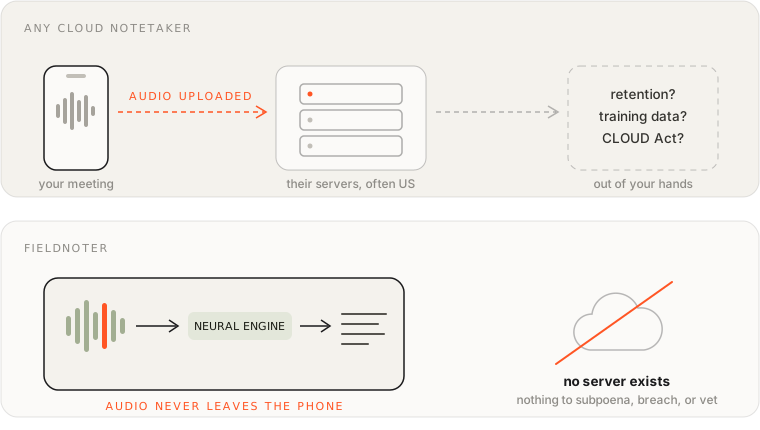
A privacy policy does not fix any of this, which is the part people miss. The problem is jurisdiction and architecture, not intentions. The provider can mean well and still be obliged to comply with a subpoena. So the security team does the only thing it can defend later: it blocks the category and moves on. What it does not do is solve your actual problem, which is that you still need to walk out of the room with an accurate record.
The three moves that make it worse
- Using the banned tool on your personal account. This is the one that gets people in real trouble. The audio still lands on the same servers the ban was about. The only thing that changed is that nobody at your company knows it is there, which turns a policy question into a you-shaped problem the day it surfaces.
- Recording quietly and hoping. Whether you are allowed to record at all is a separate question from which app you use, and it is often the more sensitive one. Know what your organization and the law where you are allow, and ask the people in the room. A recording nobody agreed to is worse than no recording.
- Giving up and taking no notes. This is the failure mode nobody notices until a decision is disputed three weeks later and no one wrote it down. The ban was about audio leaving the building. It was never an instruction to stop keeping a record.
What actually works instead
Every workable option comes down to the same move: keep the audio on hardware you control. There are three, and they are genuinely different in who they suit.
- The transcription already in your iPhone. Recent versions of iOS transcribe voice memos on the device for free, and it is more capable than people give it credit for. For a solo memo or a quick capture it is the right answer and you should not install anything. It falls down on real meetings: no speaker labels, no summary, no way to keep a month of client sessions organized.
- Running Whisper yourself. If you are comfortable in a terminal, open models like Whisper on your own laptop are free, private, and about as good as it gets. The catch is the daily reality: you record on one device and process on another, and speaker separation is a project rather than a button. Excellent for the technically inclined, a chore for everyone else.
- A purpose-built on-device app. These run the same class of models on the phone and package the parts Whisper leaves to you: the transcript, the speaker labels, the summary, all without an upload. Because there is no server in the loop, there is usually nothing for IT to object to. Quality varies between apps, so try before you commit. This is the category we work in, with an app called Fieldnoter. We think it is the right shape for confidential work, but the category is the point here, not our app.
It is worth knowing what actually happens on the phone, if only so you can explain it when IT asks. These apps use the same family of open speech models the cloud services are built on, shrunk to fit and pointed at the Neural Engine, the part of the chip Apple added for exactly this kind of work. Recording, separating the voices, drafting the summary: all of it happens on the device, in roughly the time the meeting took to record. The longer version is in how on-device transcription works.
| Keeps audio local | Speaker labels | Summaries | Good for daily meetings | |
|---|---|---|---|---|
| iPhone built-in | Yes | No | Limited | Not really |
| Whisper yourself | Yes | Extra work | Extra work | No |
| On-device app | Yes | Yes | Yes | Yes |
If you want each of these weighed properly, including the cloud tools and where they genuinely win, that is a separate piece: your options compared.
The two-minute test that ends the argument
This is the part we point people to first, because it settles the question without anyone having to trust us. It works on any app, ours included.
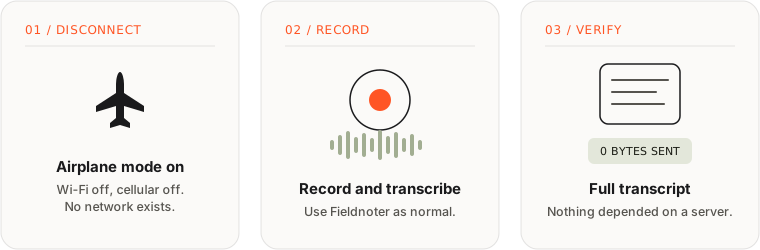
Put the phone in airplane mode and record. If a full transcript comes back with the radios off, nothing in that pipeline needed a server. If you get a spinner and an error, the audio was leaving the phone all along and the "on-device" label was marketing. Run it on any app that claims to be local, and run it on ours too. It settles the question faster than any policy document, and it is the one check we would want a security team to do on us.
Getting a local tool through the door
Even something that processes everything on the phone deserves a look from whoever owns security, and asking first is what separates you from the shadow-IT story the ban exists to prevent. A few things make that conversation short:
- Hand over a technical summary before they have to ask. If it lays out the data flows and the network behavior on a single page, most of the meeting is already done. Ours is at fieldnoter.app/it-review and prints to one sheet, and a good app will give you the equivalent.
- Point them at the airplane-mode test above so they can confirm it themselves rather than trust a claim.
- Mention the App Store privacy label. "Data Not Collected" is audited by Apple, not written by the marketing team.
- Be honest about the one exception. An app like this makes a single network call: a one-time download of the speech model when you first set it up. After that it works offline. Saying so plainly earns more trust than a "never touches the internet" line that falls apart the moment someone checks.
In most places this is a five-minute conversation, because the thing that got blocked, audio leaving the building, simply is not happening.
What the local route costs you
It would be dishonest to pretend the local route is free. Moving off the cloud means giving up the things the cloud was good at, and for some teams that is a dealbreaker worth naming out loud.
- No bot in the meeting. Nothing joins your Zoom or Teams call to listen for you. You record in the room from your phone, or import the audio afterwards. If half your meetings are remote and unattended, that is a real gap.
- No shared dashboard. The transcripts live on one phone, which is the point for confidential work and a limitation for everything else. Exports cover the handoff when a transcript needs to leave.
- No team workspace. One person, one device. The moment you need a whole team pulling from a shared library, you are back in cloud territory and the compliance questions come with it.
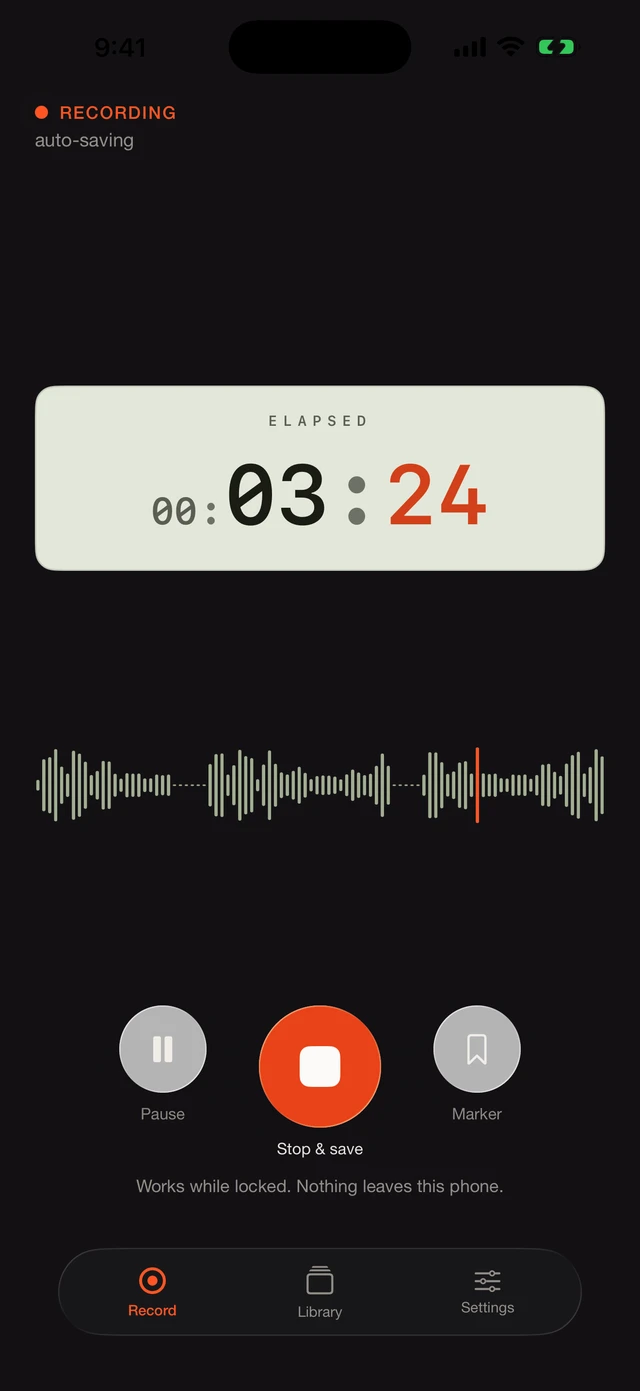
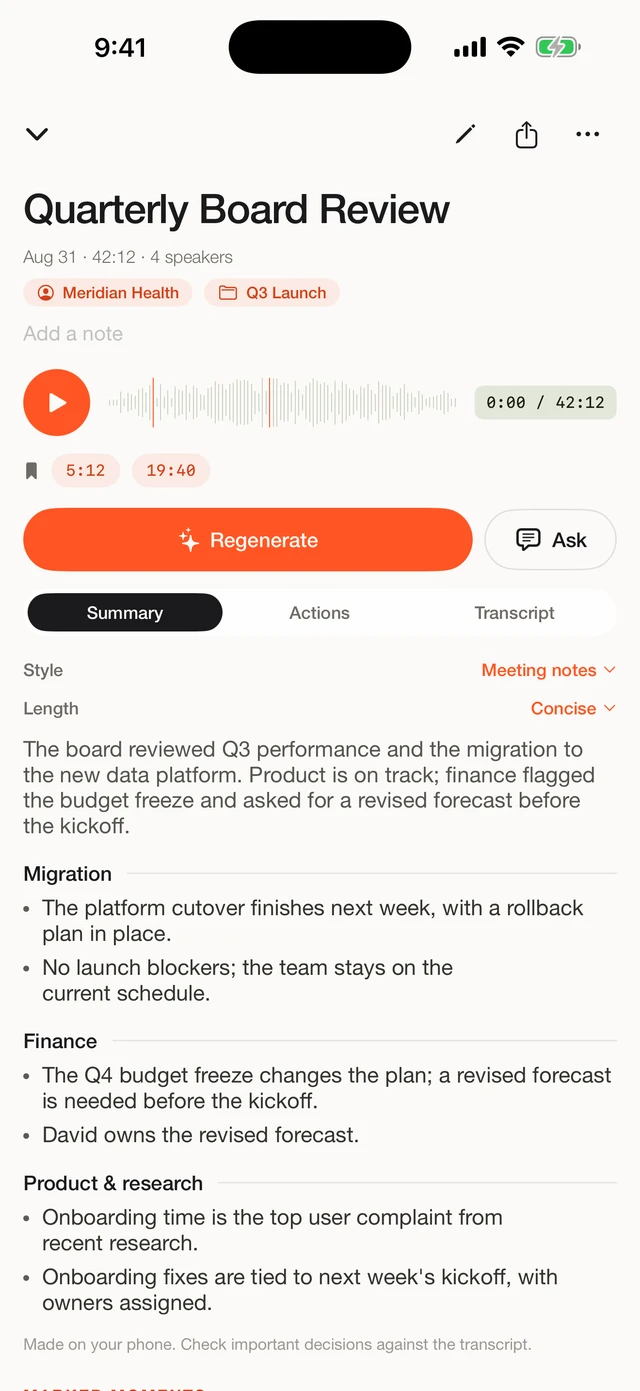
For confidential work these are usually a fair trade, and often the reason the local route exists at all: every feature that shares data is another feature someone has to sign off on. If those trade-offs do not work for you, a local app is the wrong tool, and I would rather say so than talk you into it. Here is what the workflow looks like once it does fit, in our app:
Frequently asked questions
Is it legal to record a meeting on my phone?
That depends on your jurisdiction and your organization's recording policy, which exists separately from any tooling policy. In most European countries, participants may record conversations they take part in, but workplace rules can be stricter. Check your policy and ask for consent before you record.
Does on-device transcription work without any internet connection?
Yes. After a one-time model download when you first set up the app, everything runs locally. You can verify this yourself with the airplane-mode test above.
How accurate is on-device transcription compared to cloud tools?
On-device apps run the same class of open speech models that many cloud services build on. For clear meeting audio the results are comparable. Cloud services can still have an edge on very noisy audio or exotic accents, since they can run larger models on server hardware. How this works under the hood: how on-device transcription works.
Do I still need IT approval for an app that uploads nothing?
Formally that depends on your organization. Practically: ask anyway. It is a short conversation, and asking is exactly what distinguishes you from the shadow-IT scenario the ban was meant to stop. The fact sheet makes that conversation faster.
What happens to my recordings if I delete the app?
With an on-device app like Fieldnoter, recordings and transcripts exist only inside the app on your phone. Delete a recording and it is gone. Delete the app and everything goes with it. There is no copy anywhere else.
We built Fieldnoter because we think this is how confidential recording should work: the whole job on the phone, nothing on a server. If that fits how you work, it is on the App Store. And whatever you choose, run the airplane-mode test first. It is the fastest way to see whether an app does what it claims.
See Fieldnoter