Comparison
Fieldnoter vs Apple Voice Memos: when the built-in app is enough
Before you install anything, it is worth saying the obvious: Apple Voice Memos is free, it is already on your iPhone, and it transcribes on the device. For a quick memo, that is often all you need, and no paid app changes that. We make Fieldnoter, the paid app in this comparison, so read the parts about it as coming from the people who build it. This guide is an honest look at where the built-in app is enough, and where a dedicated tool starts to earn its price. Privacy, as it happens, is not the line between the two.
In this article
What the two have in common
Start with the part most comparisons skip. Recent iPhones transcribe voice memos on the device, for free, with nothing uploaded. Fieldnoter also runs its transcription on the device, after a one-time download of the speech model when you first set up the app. So on the question people care about most, where the audio goes, the two land in the same place. Both keep the recording on your phone.
That means both pass the airplane-mode test. Put the phone in airplane mode, record, and the transcript still appears, because nothing in the pipeline depends on a server. If you have been comparing these tools because you are worried about audio leaving your phone, you can relax about that specific worry for either one. This is a shared strength, and it is worth being clear that a paid app does not buy you more privacy than the free one here.
So the difference sits somewhere other than privacy. It comes down to what each app does with the recording once it has it.
Where Voice Memos stops for real meetings
Voice Memos is built around a simple idea: one recording, one transcript, saved to a list. That works well for a single voice. It starts to show gaps the moment a recording is a meeting with several people and a follow-up attached. As of mid-2026, and without leaning on version numbers that change, here is where the built-in app stops.
- No speaker separation. You get one running transcript with no labels for who said what. In a meeting with four people around a table, you are left to work out the speakers by memory.
- No meeting summary or action items. The transcript is the whole output. There is no summary of what was decided and no list of the tasks that came out of the conversation.
- No organization by client or project. Recordings pile up in one flat list. There is no way to keep every session for a given client or project grouped together.
- No templates. Every recording is treated the same, with no structure for the kind of session you are capturing.
- No subtitle or structured exports. You cannot export subtitle files such as SRT or VTT for video, or structured formats such as JSON or CSV for a spreadsheet or another tool.
None of this is a knock on Voice Memos. It was built as a memo app, and at that it is very good. The gaps only start to matter when your recording is a working document that other work depends on.
The two side by side
The table below lays out the practical differences. On the shared row that gets the most attention, on-device processing, both earn a yes.
| Voice Memos | Fieldnoter | |
|---|---|---|
| On-device transcription | Yes | Yes |
| Free | Yes | 10 free, then one-time |
| Speaker labels | No | Yes |
| Summary and action items | No | Yes (early access) |
| Client and project organization | No | Yes |
| Exports (TXT, SRT, VTT, JSON, CSV) | No | Yes |
| App lock (Face ID) | No | Yes |
Read the table the right way. Voice Memos wins outright on price and on being already installed. Fieldnoter wins on everything that turns a recording into a usable meeting record. Which column matters depends entirely on what you are recording.
Weighing up more than these two? The wider comparison covers on-device apps, cloud tools, and the honest downsides of each.
See your options compared →When Voice Memos is the right choice
Reach for Voice Memos when the recording is for you and only you. A thought you want to capture while driving. A single interview you will listen back to yourself. A lecture you want as rough text to skim. A reminder dictated in a hurry. In all of these, there is one voice or one purpose, no follow-up to hand off, and no need to know who said what.
For that kind of memo, installing another app is a waste of your time. The built-in tool is free, it opens in a tap, and it does the job. If your recording life is mostly personal notes, you can stop reading here and keep using what Apple already gave you. That is a genuine recommendation, not a throwaway line.
When a dedicated app earns its price
The calculation changes when a recording is a working document. A client session you will bill against. A team meeting with decisions and owners. A research interview you will quote and cite. A stand-up whose action items need to reach Reminders. Here the plain transcript is only the raw material, and the work is in the structure around it.
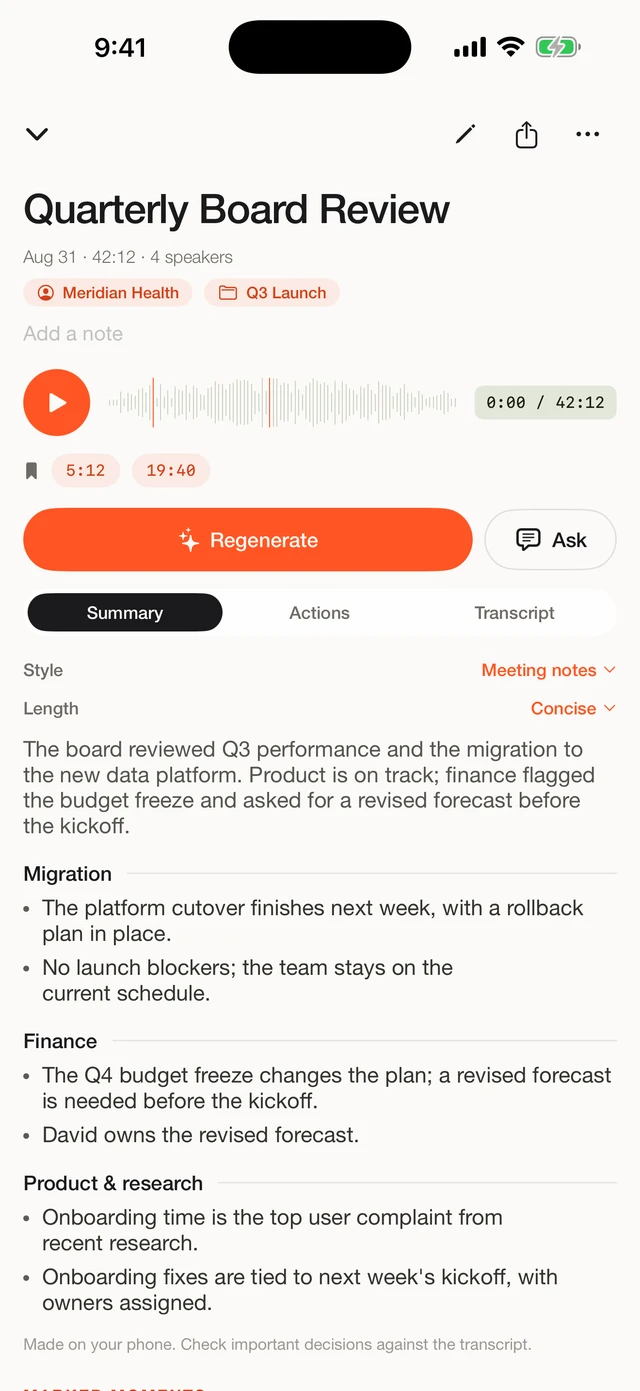
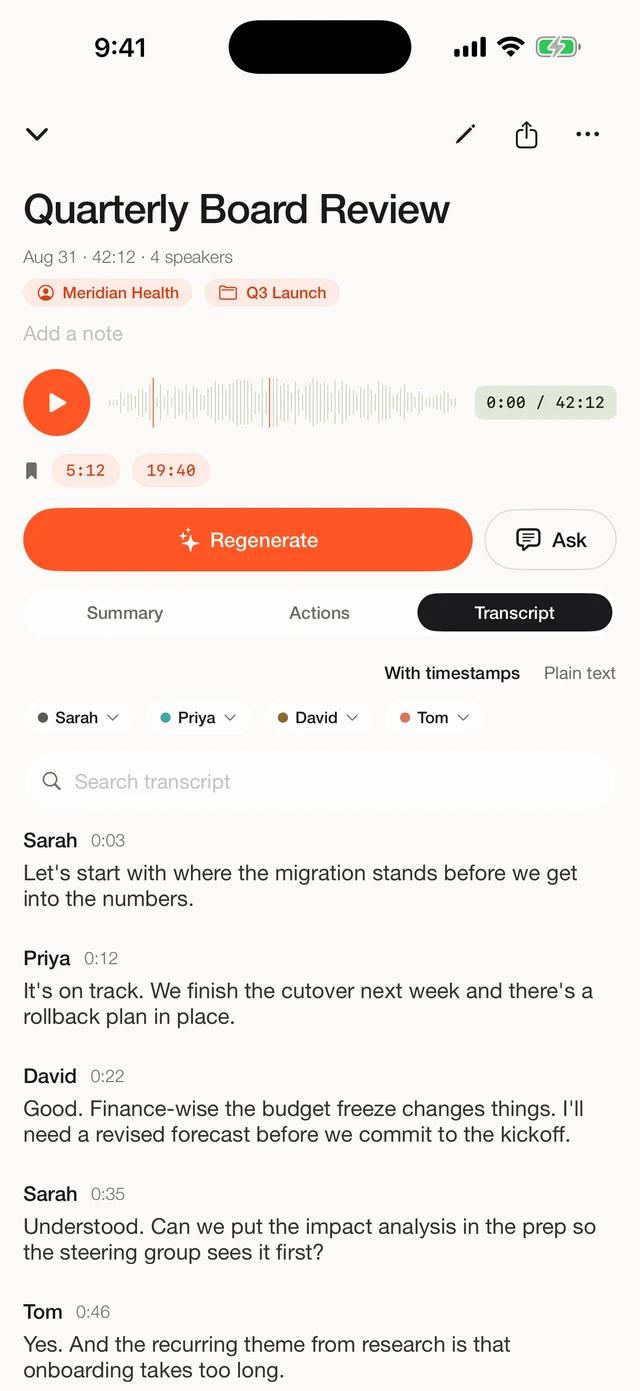
This is the gap we built Fieldnoter for. It separates the speakers so the transcript reads like a conversation, writes a summary, and pulls out the action items (early access). It keeps every session grouped by client and project, sits behind Face ID if you want it to, and exports in the formats other tools expect. All of it stays on the device, so you gain the structure without giving up the on-device footing you already had with Voice Memos.
IN THE APP
What the built-in app leaves on the table
A finished transcript with named speakers, the conversation split into timestamped segments, and the action items (early access) ready to send to Reminders. This is the structure a memo app does not try to give you.
Frequently asked questions
Is Voice Memos private enough for confidential conversations?
Yes, in the sense that matters most: the recording is made and transcribed on your iPhone, so the audio is not being uploaded to a transcription service. One thing to check for confidential work is iCloud sync. Voice Memos can sync your recordings to iCloud across your devices, which is a setting worth reviewing before you record something sensitive. Fieldnoter recordings are not included in an iCloud backup and stay in the app on the device.
Can Voice Memos tell speakers apart in a meeting?
As of mid-2026, no. Voice Memos produces one running transcript with no labels for who said what. For a solo memo that is fine. For a meeting with several people, you have to work out the speakers yourself. Fieldnoter separates speakers automatically and lets you name each voice once so the name carries through the whole transcript.
Does Voice Memos give me a summary and action items?
No. Voice Memos gives you the recording and a plain transcript. It does not write a summary or pull out action items. Fieldnoter writes a summary on the device and produces a list of action items (early access) you can send to Reminders.
Can I export subtitles or structured data from Voice Memos?
As of mid-2026, no. Voice Memos does not export subtitle files such as SRT or VTT, or structured formats such as JSON or CSV. Fieldnoter exports TXT, SRT, VTT, JSON, and CSV, so the transcript drops into a video editor, a spreadsheet, or another tool.
Do I have to pay for Fieldnoter?
Voice Memos is free and already on your iPhone. Fieldnoter lets you record for free and gives you ten free transcriptions to try it. After that a single one-time purchase of 19.99 euro covers unlimited use. There is no subscription and no account.
We built Fieldnoter for the recordings that outgrow a memo app: meetings with several voices, a summary and action items (early access) to hand off, sessions to keep sorted by client. If your recording life is mostly personal notes, Voice Memos already has you covered, and we would rather say so than talk you into a paid app. If it is meetings, Fieldnoter is on the App Store.
See Fieldnoter