Explainer
How accurate is on-device transcription?
It is the first question we hear from almost everyone before they trust an app with their meeting notes. The honest answer is that accuracy depends far more on your audio than on any app's marketing. A quiet room and a phone near the speaker will beat a noisy recording every time, whatever tool you use. We wrote this to explain what accuracy really means, what moves it up or down, how on-device compares with cloud, and how to judge it for your own work in a few minutes.
In this article
What "accuracy" actually means
Speech researchers measure accuracy with something called word error rate. It counts the words a system gets wrong, the words it misses, and the words it invents, then compares that total against a careful human transcript of the same audio. A lower error rate means a cleaner transcript. It is a useful yardstick, but it is a rate, not a promise about your next recording.
This is why a flat claim like "99% accurate" tells you very little. A number like that only holds for a particular test set, recorded under particular conditions, in a particular language. Change the room, the microphone, or the accent and the same system will land somewhere else entirely. A figure measured on clean studio audio says almost nothing about a busy meeting room. Treat any single headline percentage as a best case, not a guarantee.
What matters in practice is whether the transcript is good enough that you can read it, correct a few words, and trust the summary built from it. That is a judgement about your recordings, not about a benchmark run somewhere else.
What really determines it
Four things move accuracy up or down far more than the choice of app. Understanding them is the fastest route to a better transcript, because most of them are within your control.
- Distance to the microphone and background noise. This is the single biggest factor. A phone on the table next to the person speaking captures a clean signal. A phone across the room picks up more of the air conditioning, the traffic, and the echo than the voice. Any speech model works from the signal it is given, so a weak signal caps the result before recognition even starts.
- People talking over each other. When two voices overlap, there is no clean single stream to transcribe, and separating who said what becomes harder as well. Fast, interrupted conversation is one of the hardest cases for any system.
- Accents and specialist vocabulary. Common accents are handled well, because the models are trained on a wide range of speakers. Strong regional accents, switching between languages mid-sentence, dense jargon, product names, and unusual personal names are harder. A model can only spell a term it has effectively seen before.
- The size of the model. Larger models generally recognize speech more reliably, especially on difficult audio, at the cost of more memory and processing time. A phone runs a model sized to work smoothly on the device, which is a sensible balance for meeting audio rather than a limit you will usually notice.
| Factor | Helps accuracy | Hurts accuracy |
|---|---|---|
| Microphone distance | Phone near the speaker | Phone across the room |
| Background noise | Quiet room | Cafe, traffic, fans |
| Turn-taking | One voice at a time | People talking over each other |
| Speech clarity | Steady pace, clear diction | Mumbling, rushed speech |
| Vocabulary | Everyday words | Dense jargon, rare names |
| Audio source | Direct recording or clean import | Compressed, echoey file |
On-device versus cloud, honestly
There is a common assumption that anything running in the cloud must be more accurate than anything running on a phone. The reality is more even than that. Most cloud transcription services build on the same family of open speech models that on-device apps use. The recognition engine is often from the same lineage; the difference is where it runs.
That difference does matter at the edges. A server can run a larger model than a phone can hold, and larger models tend to cope better with the hardest audio. So for a recording full of crosstalk, heavy background noise, or an unusual accent, a cloud service may pull ahead. For clear meeting audio, which is most meetings, the results sit in the same range. The audio you feed in decides more than the venue that processes it.
On-device carries its own advantages that have nothing to do with word error rate. The audio never leaves the phone, so there is no upload, no third-party server, and no account. Fieldnoter's App Store privacy label reads "Data Not Collected", and the app works in airplane mode after a one-time model download. For confidential conversations, that is often worth more than a marginal accuracy gain on difficult audio. We lay out the full trade-off in how on-device transcription works.
Wondering how this compares with the transcription already built into your iPhone? We put the two side by side.
Fieldnoter versus Apple Voice Memos →What you can do for better results
Because audio quality is the main lever, small habits make a real difference. None of these require new equipment.
- Put the phone closer to the speakers. Place it on the table, roughly in the middle of the group, away from a laptop fan or a noisy window. In a larger room, closer to the main voices is better than central but distant.
- Start from good source audio. If you import a file rather than record live, a clean original beats a heavily compressed one. A direct recording or a lightly processed export gives the model more to work with than a file that has been squeezed for email.
- Name the speakers and fix the outliers. The app separates voices automatically and labels them. Tap a label to add the real name, and correct any word the model clearly misheard, such as a product name or a surname. The name and the correction carry into the summary and every export, so a minute of tidying pays off across the whole document.
- Reduce overlap where you can. In a meeting you are running, gently encouraging one voice at a time helps the transcript as much as it helps the room.
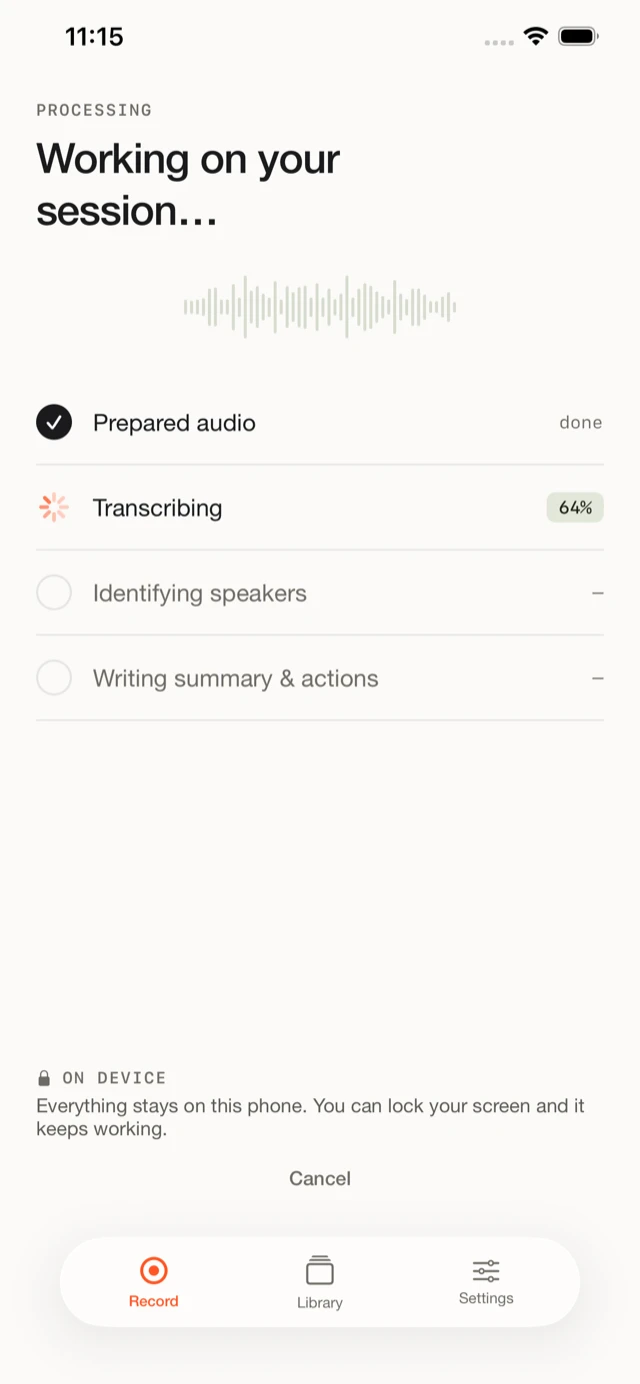
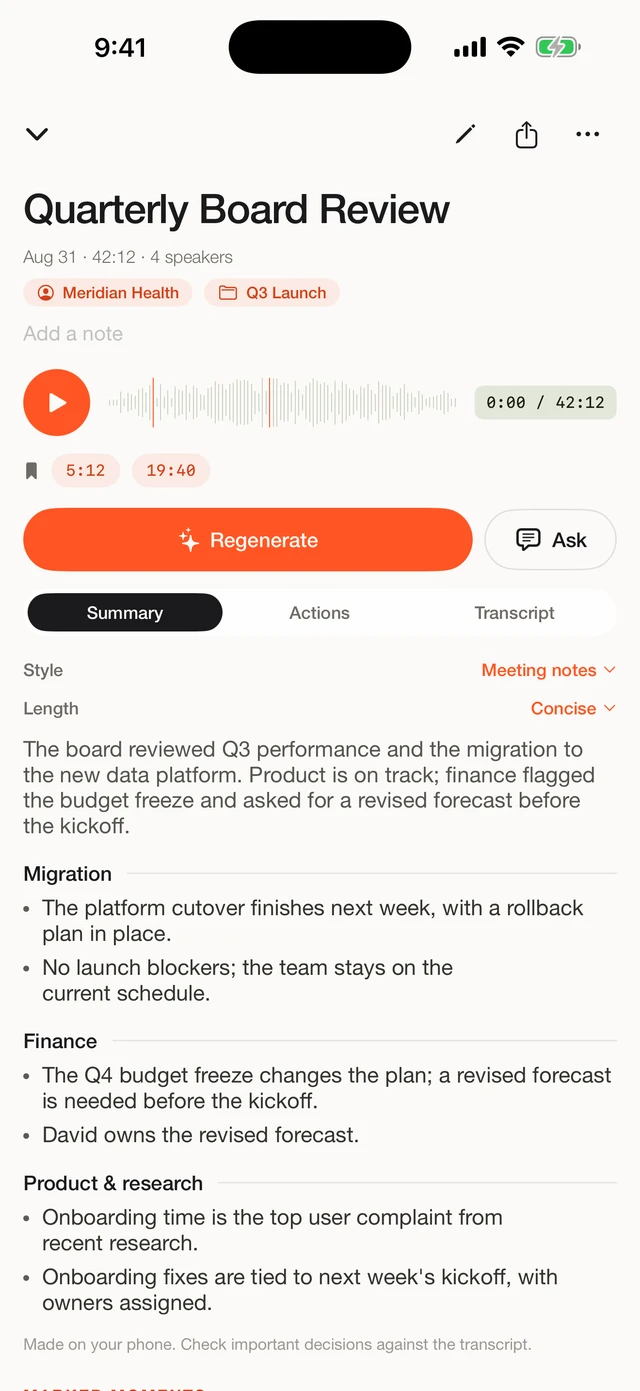
Here is what that workflow looks like inside the app, from processing to a named, timestamped transcript.
In the app
From raw audio to a transcript you can trust
Recording is processed on the Neural Engine, then arrives as a transcript with speakers already separated into timestamped segments. Name a voice, correct a word, and the change carries through to the summary and exports.
How to test it yourself
Any published figure is measured on someone else's audio. The only test that answers your question is one that uses your voices, your vocabulary, and your room. We give you 10 free transcriptions in Fieldnoter for exactly this reason, which is enough to run that test properly before you decide.
Record a real meeting of the kind you actually hold, or import a file you already have. Place the phone where you would normally place it. Then read the transcript against your memory of what was said, and note where it slips: is it the crosstalk, a particular accent, a piece of jargon, or the far end of the table? That tells you both how well the app fits your work and what to adjust next time. A quiet one-to-one and a crowded workshop will give very different results, and both are worth knowing.
This kind of test settles the accuracy question faster than any benchmark, because a benchmark measures a room you will never sit in. Your own recording measures the one you will.
Frequently asked questions
Is on-device transcription as accurate as cloud tools?
For clear meeting audio, the results are in the same range, because both run the same class of open speech models. Cloud services can still have an edge on very noisy recordings or unusual accents, since server hardware can run larger models. For most everyday meetings the audio matters more than where the processing happens.
Does on-device transcription handle accents?
The models are trained on a wide range of speakers, so most common accents are handled well. Strong regional accents, code-switching between languages, and rare names are harder for any speech model. Clear audio and a phone placed near the speaker help more than anything else here.
Does naming speakers make the transcript more accurate?
Naming a speaker does not change how the words themselves are recognized. What it does is make the transcript easier to read and correct, and it carries the right name into the summary and every export. Separating who said what is a different task from turning speech into text, and the app does both.
Does running everything on the phone drain the battery?
Transcription runs on the Neural Engine, the part of the chip built for this kind of work, so it is more efficient than doing the same job on the main processor. A long meeting will use some battery while it processes, in the same way a video export does. For a normal recording the cost is modest.
What is the best way to judge accuracy for my own work?
Test it with your own kind of meeting in your own room. Record a real conversation, or import a file you already have, and read the transcript against what was said. That tells you more than any published number, because it uses your voices, your vocabulary, and your acoustics.
We built Fieldnoter because we think the best accuracy test is your own room, run on your own terms: it transcribes, labels speakers, and summarizes meetings entirely on your iPhone, works in airplane mode, and needs no account. Your first 10 transcriptions are free, with a one-time purchase after, which is enough to judge it on your own audio.
See Fieldnoter