For students & researchers

Lectures and interviews, written up on your phone.

Record a two-hour lecture and read it back as text before the exam. Transcribe your fieldwork interviews with the speakers labeled. Fieldnoter runs on your iPhone, and one payment covers it, so it fits a student budget.

Study life produces a lot of talking that you later need as text. A student sits through a two-hour lecture and wants to read it back before an exam. A researcher records interviews in the field and has to quote them accurately in a thesis. Both jobs come down to the same thing: capture what was said, then turn it into text you can search and revise from. Typing while you listen means you miss half of it, and writing up from memory afterwards loses the detail.

Fieldnoter records the audio, transcribes it with speaker labels, and gives you a summary to study from, all on your iPhone. The reasons students and researchers reach for it are practical. It is a one-time purchase, so no monthly subscription eats into a student budget. It runs offline, which matters when the signal in a lecture hall drops to nothing. And there is no server that could receive the audio, so your own fieldwork recordings stay under your control.

We should be plain about what it is not. Fieldnoter does not join a video lecture as a bot and does not give you a shared web dashboard for a research team. It is a private recorder and transcriber that lives in your pocket and keeps each recording on the device. For a lot of academic work, that is exactly the shape you want.

The workflow

From the lecture hall to your paper, on one device.

Study life has two recording jobs: sitting in class, and running your own interviews. Fieldnoter handles both without a login or an upload.

01 / In the lecture hall

Capture the whole class

Press record when the lecture starts, or import an audio file the department shared afterwards. Fieldnoter works offline, so a weak signal in a basement lecture hall does not stop it.

  • Record live, or import an existing file
  • Works in airplane mode, no signal needed
  • Keeps recording while the screen is locked
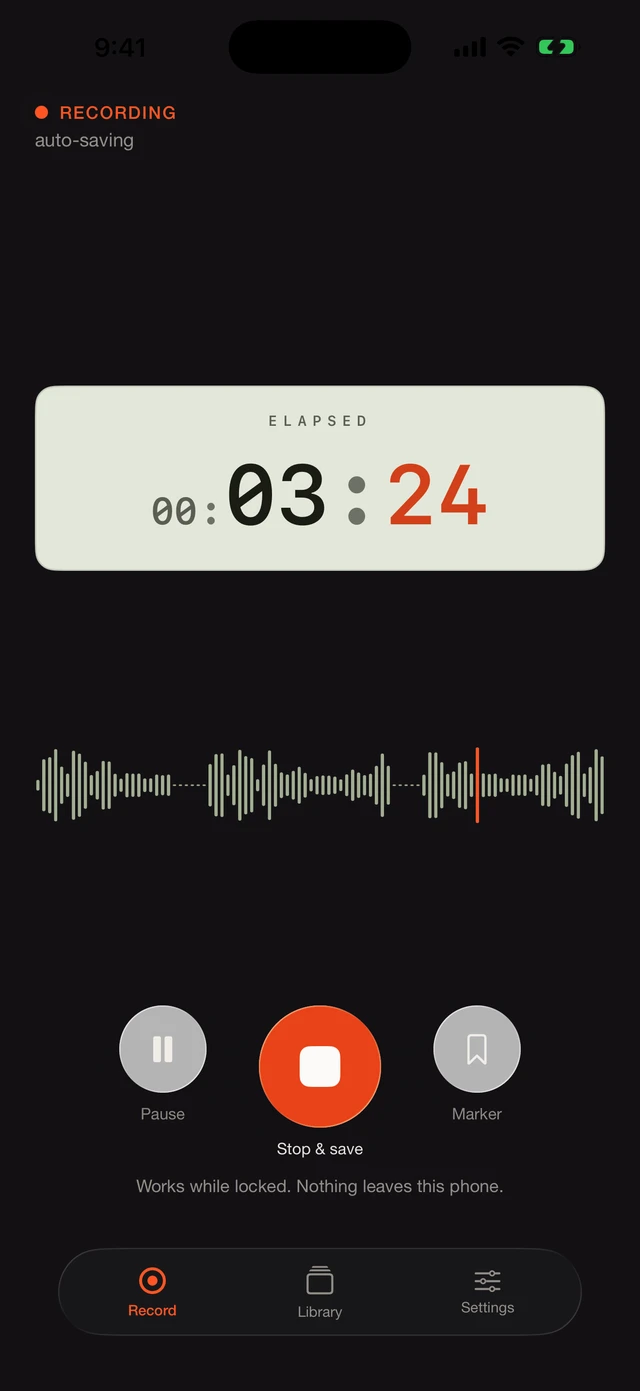
Fieldnoter recording a lecture live with a waveform on screen

02 / Study from the transcript

Read it back and revise

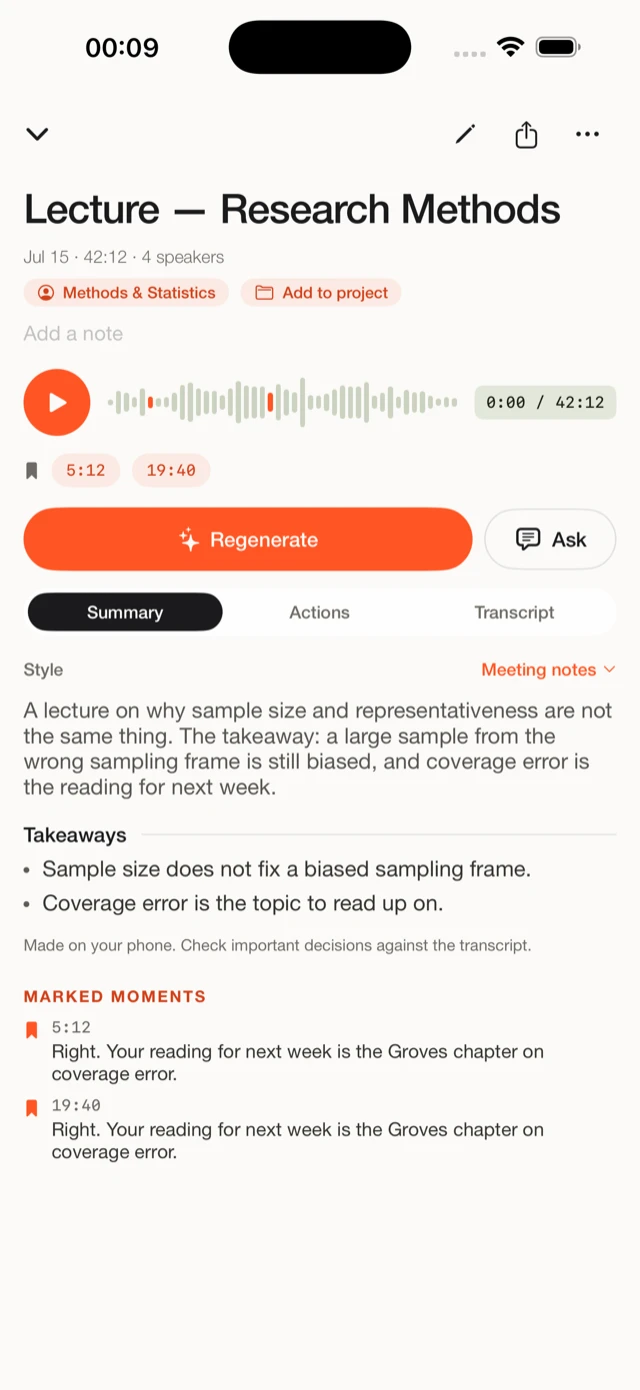
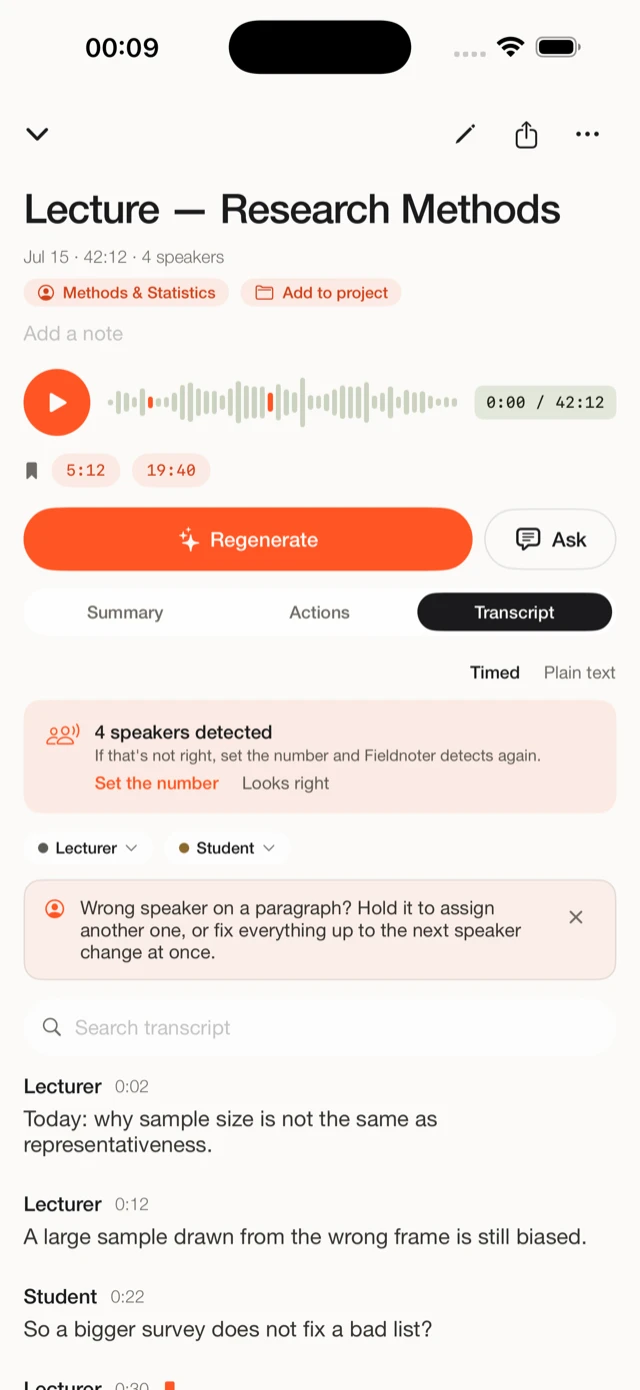
Get a full transcript with speaker labels and a short summary you can study from. Search the text to find the part of the lecture you half remember, instead of scrubbing through audio.

  • Transcript with speaker labels and timestamps
  • A summary to revise from before an exam
  • Search the text to jump to any moment
A lecture transcript in Fieldnoter with speaker labels and a study summary

03 / Research interviews

Write up your fieldwork

Interview a participant, then label each voice once so the names carry through the transcript. Export the result and quote it in your thesis or paper. The audio stays on your phone the whole time.

  • Speaker labels for participant and interviewer
  • Segments with timestamps you can cite
  • Export to TXT, SRT, VTT, JSON, or CSV
Interview transcript in Fieldnoter split into timestamped segments by speaker

Where on-device actually matters for study

A lecture is not a secret. An interview can be.

It is worth being honest about this, because the privacy pitch does not fit every part of student life. A lecture delivered to a full hall is public in any meaningful sense. Recording it for your own revision is a convenience question, not a confidentiality one, and you do not need a special tool to protect a talk that a hundred people already heard. If that were all you did, the built-in voice recorder on your phone would cover most of it.

The picture changes the moment you run your own fieldwork. When you interview a participant, you have usually promised them confidentiality, and an ethics board expects that recording to stay under your control. Uploading it to a cloud transcription service puts a person's words on someone else's infrastructure, under terms your participant never agreed to. This is where an on-device app earns its place: because Fieldnoter has no server that could receive the audio, the interview stays on your phone, and you can show that by recording in airplane mode. The wider explainer on how on-device transcription works covers what runs on the phone and why nothing needs a server.

So use the right lens for the right recording. For lectures, Fieldnoter is a time-saver that turns hours of audio into searchable text. For interviews, it is a way to honour a promise you made to a participant. The step-by-step guide to transcribing a confidential interview walks through keeping participant recordings on the device, from consent to export.

The short version

The interview never leaves your phone.

Fieldnoter has no server that could receive the audio, so a participant interview stays on the device from consent to export. A lecture that a hundred students attend is a convenience to capture, not a secret to protect, and that is the honest split. The other reason students pick it is plainer: one payment, no monthly subscription.

On deviceinterviews stay on your phone
One paymentno subscription to carry
Offlineworks in any lecture hall

Questions students ask

Before you record.

Does it work offline in a lecture hall?

Yes. After a one-time model download when you first set up the app, transcription runs on the device. A basement lecture hall with no signal is fine, and airplane mode works too, which also proves the audio is going nowhere.

Is there a subscription?

No. Recording is free, and your first five transcriptions are free. After that a single one-time purchase of 14.99 euro covers unlimited use. There is no account and no renewal, which is the main reason it fits a student budget.

Can I transcribe research interviews privately?

Yes. Fieldnoter has no server that could receive the audio, so a participant interview stays on your phone. That fits the confidentiality and consent you usually promise a participant, and what an ethics board expects. You can also keep recordings behind Face ID.

How good is the quality when the speaker is far away?

Honestly, closer is better. A lecturer at the front of a large hall, picked up by a phone at the back, gives a harder recording than an interview across a table. For clear, nearby speech the transcript is strong. For a distant speaker in a noisy room, expect more to fix by hand.

Can I export for my thesis?

Yes. Every transcript keeps timestamped segments you can cite, and you can export as TXT, SRT, VTT, JSON, or CSV to drop quotes into your thesis or paper. The audio stays on your phone the whole time.

Read next

Set it up the right way.

Lectures and interviews, transcribed on your phone.

Free for your first 5 transcriptions. One payment after that, no subscription, no account.